Multi-Domain Scenarios and Recommendation
MGW → HIN Gateway – Mail-Flow Architecture, Phased Rollout, and Rollback Plan
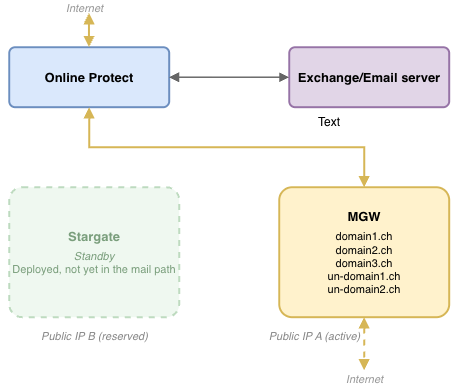
Phase 1 – Starting Point: Baseline (All Domains on MGW)
Baseline state
- All domains are routed through the MGW. Example: domain1.ch, domain2.ch, domain3.ch, un-domain1.ch, un-domain2.ch
- The HIN Gateway is deployed and prepared, but no live traffic is routed through it yet.
- DNS MX/SPF records still point to "Public IP A" (MGW), where the MGW is the front-facing gateway or the last MTA.
Pre-flight checklist
- Establish a baseline for the current MGW capacity and mail-flow logs.
- Validate HIN Gateway connectivity to Online Protect, Exchange Online, and the on-premises e-mail server.
- Align stakeholders on the migration schedule and communication plan.
- Review firewall/port documentation ahead of Public IP B provisioning (Phase 2, step 1)
Phase 2 – Migration: Gradual Domain-by-Domain Example
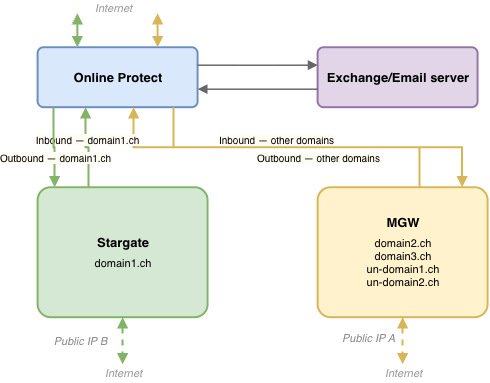
Migration steps
- Provision HIN Gateway — assign
Public IP Band update firewall rules (see network documentation for required ports) - Create two connectors in Exchange Online—one inbound and one outbound—pointing to the HIN Gateway.
- Add a mail-flow rule that routes by domain: domain1.ch → HIN Gateway, all remaining domains stay on MGW
- Repeat the process gradually, moving one additional domain at a time until all domains are routed through the HIN Gateway.
Roll-back (per domain)
- Point the affected domain's mail-flow rule back to MGW
- Leave the Stargate connectors in place for the next attempt
- Keep an ordered change log of every connector and rule modification. A rollback must apply these changes in reverse order.
Watch for customer-specific headers
Some domains rely on custom X-headers (routing, anti-spam allow-lists, compliance tags). Confirm that the HIN Gateway connectors preserve or replicate these headers before migrating a domain. Missing headers may result in incorrect routing or rejected e-mails.
Phase 3 Final - fully migrated to HIN Gateway
Warning
After successful testing, please keep the new HIN Gateway on Public IP B and do not change this IP address. Changing the public IP will break the secure tunnel, causing the gateway to stop receiving certificate updates.
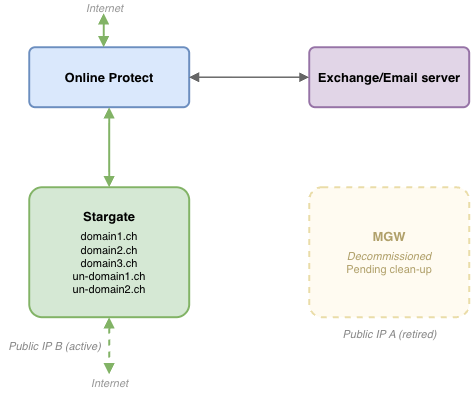
End state
- All domains now flow through HIN Gateway
- MGW carries no production traffic
- DNS/SPF records now point to Public IP B where the HIN Gateway is the front-facing gateway or the last MTA.
Clean-up checklist
- Remove the old MGW connectors and mail-flow rules
- Decommission the MGW VM once monitoring confirms that it is receiving no traffic and that e-mail flow is functioning correctly
- Release Public IP A if no longer required
- Update runbooks and DNS documentation
Recommended Migration Approach by Number of Domains
Customers with 3 Domains or Fewer
- HIN recommends migrating all domains at once.
- HIN will support the customer in successfully migrating the first domain.
- Once the first domain has been migrated successfully, the customer can migrate the remaining domains independently.
- This approach keeps the migration simple and avoids the need for a parallel environment.
Customers with More Than 3 Domains
- HIN recommends setting up a parallel environment alongside the existing MGW.
- Domains can then be migrated gradually to the new environment.
- HIN will support the customer in successfully migrating the first domain.
- After the first successful migration, the customer can decide how and when to move the remaining domains to the new environment.
Warning
Confirm the exact firewall ports and connector settings against the current network documentation before performing any installation steps.
Note
See the specific notes in the HIN Gateway Installation Guide regarding multi-domain migration.